
Share This Blog Post
You’ve sourced the product. Written a decent title. Added some photos. Listed it on eBay. And then… nothing. No views. No sales. The listing just sits there while your competitors clean up.
If this sounds familiar, you’re almost certainly suffering from one of the most common — and most fixable — problems in eBay selling: incomplete or inaccurate listing data. And at the heart of it is a feature that most sellers either rush through or ignore entirely: eBay item specifics.
In this guide, we’ll break down exactly why item specifics matter, what the data says about how they affect your search visibility, and how to use a free eBay listing checker to uncover exactly where your listings are losing you sales — before your competitors find out first.
What Are eBay Item Specifics — and Why Do They Matter So Much?
eBay item specifics are the structured data fields attached to every listing. Think of them as the product passport — fields like Brand, Colour, Size, Material, Model Number, MPN, GTIN/EAN, Compatible Vehicle, Type, and hundreds of category-specific attributes that describe exactly what you’re selling.
Unlike your listing title or description, item specifics feed directly into eBay’s Cassini search algorithm — the system that decides who sees your listing and who doesn’t. Cassini uses item specifics to match your product against buyer searches and, crucially, buyer filters.
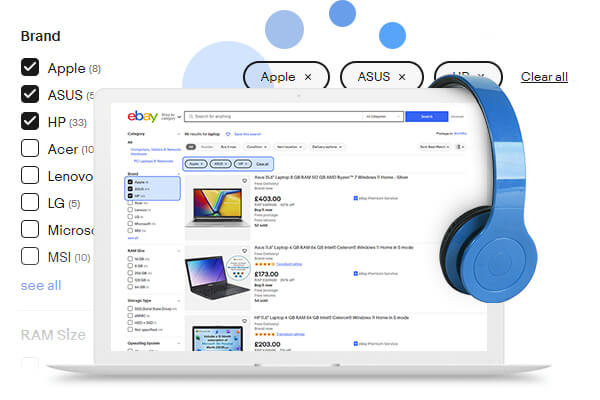
Here’s the critical insight: if a buyer narrows their eBay search results by selecting “Colour: Blue” in the sidebar, eBay will only show listings where the Colour specific has been filled in as “Blue.” It doesn’t matter if the word “blue” is in your title. It doesn’t matter if your description mentions it three times. If the item specific is blank — or wrong — your listing is invisible to that buyer.
Given that filtered searches represent a huge proportion of buyer activity on eBay, missing item specifics can quietly suppress your impressions across a large slice of your potential audience. Frooition’s dedicated eBay item specifics service exists precisely because this problem is so widespread — and so fixable.
Understanding the eBay Cassini Algorithm: What It Actually Rewards
eBay’s Cassini algorithm is the engine behind every search result page on the platform. Where Google’s algorithm tries to find the most relevant and authoritative content, Cassini has a single-minded focus: the likelihood of a sale.
Cassini evaluates listings across several dimensions:
- Keyword relevance — how well your title and item specifics match the buyer’s search query
- Item specifics completeness — are required and recommended fields filled in correctly?
- Seller performance metrics — feedback score, defect rate, shipping speed, return policy
- Click-through rate (CTR) — are buyers clicking your listing in search results?
- Conversion rate — what proportion of viewers actually purchase?
- Price competitiveness — is your price in line with comparable sold listings?
- Policy compliance — does the listing meet eBay’s current category data requirements?
Notice how item specifics completeness appears near the top of that list. This isn’t an accident. eBay’s own research consistently demonstrates that listings with complete item specifics receive significantly more impressions and sell at a higher rate than those with gaps.
eBay itself is clear on this point: their official guidance on adding item specifics (eBay Seller Centre) states that completing item specifics helps buyers find your listings through search and filters, and that more complete data leads to better placement in results.
The implication for sellers is stark: incomplete item specifics don’t just miss some buyers. They actively signal to Cassini that your listing is lower quality — and Cassini responds by ranking it lower across the board. A professional eBay SEO strategy always starts with getting item specifics right before anything else.
The Six Listing Problems That Are Costing You Sales Right Now
Based on analysis of thousands of professional eBay stores, the same issues appear again and again. Here are the six most common — and most damaging — listing problems that suppress visibility and reduce sales.
1. Missing Item Specifics
This is, by a significant margin, the single biggest cause of suppressed eBay listings. eBay categories have required specifics (mandatory for listing) and recommended specifics (optional, but strongly rewarded by Cassini). Many sellers fill in the mandatory fields to get the listing live, then ignore the rest.
That’s a costly mistake. Every recommended specific you leave blank is a filter you’re invisible in. For high-volume sellers with hundreds or thousands of listings, these gaps can suppress millions of monthly impressions across the catalogue.
2. Weak or Under-Optimised Titles
eBay gives you 80 characters for a listing title. Research consistently shows that most sellers use fewer than 60. Those wasted characters represent missed keywords — and missed buyer searches you could be appearing in but aren’t.
Title optimisation isn’t just about stuffing in keywords. It’s about understanding what buyers actually search for in your specific category, structuring the title so the most important terms appear early, and ensuring your keyword density matches the patterns that top-ranking competitor listings use. Get it right, and title fixes alone can drive up to 40% more impressions.
3. Wrong Category Placement
Cassini uses category as a primary relevance signal. A listing in the wrong category will underperform — sometimes dramatically — because it’s competing for irrelevant search queries and missing the buyers who are browsing or filtering within the correct category.
Category miscategorisation is more common than sellers realise, especially when listing in bulk or using automated listing tools that rely on product data feeds. A single incorrect parent category choice can suppress an entire group of related listings simultaneously.
4. Google Shopping Rejections
One of eBay’s most underappreciated seller benefits is that it automatically syndicates eligible listings to Google Shopping — effectively giving you free product ads in Google’s search results at no additional cost. For high-volume sellers, this off-eBay traffic can be substantial.
However, Google Shopping has strict feed requirements. Listings with missing GTINs (barcodes/EAN codes), vague titles, non-compliant images, or incomplete product data are silently rejected from the feed. They don’t appear in Google Shopping at all — and most sellers have no idea this is happening.
In one analysis of a mid-sized eBay fashion retailer, 47% of their listings were being rejected by Google Shopping. After fixing the underlying data issues, their off-eBay traffic increased significantly within weeks — traffic they had been generating zero of, for free, had they simply optimised the data.
5. eBay Policy Non-Compliance
eBay’s listing requirements are not static. Category data requirements update regularly as eBay rolls out new item specifics frameworks, and listings that were fully compliant six months ago may no longer meet current requirements.
Non-compliant listings can be suppressed or removed from search overnight without warning. For sellers managing large catalogues, checking compliance manually is essentially impossible — which is why systematic checking tools are essential.
6. Poor Image Quality
Cassini measures click-through rate as a direct ranking signal. Poor product images reduce CTR — buyers scroll past listings that don’t look professional or that fail to show the product clearly. Lower CTR signals lower relevance to Cassini, which depresses your ranking, which reduces impressions further. It’s a self-reinforcing downward spiral.
eBay’s own research indicates that listings with optimised, high-quality images sell up to five times more than those with poor visuals. That’s not a marginal uplift — it’s a fundamental driver of listing performance.
The Real Numbers: What Listing Optimisation Can Actually Deliver
Theoretical arguments about algorithm signals are one thing. Actual results are another. Here’s what professional sellers have found when they systematically checked and fixed their eBay listing data:
- One UK electronics PowerSeller discovered they were missing out on over 2 million search impressions per month across their 400-listing catalogue. Within three weeks of fixing their item specifics, their impressions had more than doubled.
- A UK auto parts Top Rated Seller found that optimising their listings potentially increased their search visibility by over 800 million impressions per month — a number that underscores just how severe the suppression effect of poor listing data can be at scale.
- A UK fashion business seller found that 47% of their listings were being rejected by Google Shopping — an entire channel of free traffic they were simply not participating in.
These are not outliers. They are representative of the findings when professional sellers run a structured listing health audit for the first time. Most sellers — even experienced, high-volume ones — have significant listing data issues they are completely unaware of.
How to Audit Your eBay Listing Health: What to Check and Why
A comprehensive eBay listing health audit should cover the following areas:
Item Specifics Gap Analysis
For each listing, identify which required and recommended item specifics are missing relative to the current eBay category requirements. Pay particular attention to: Brand, Colour, Size, Material, MPN, GTIN/EAN, Type, and any category-specific mandatory fields. Prioritise listings in high-traffic categories and those with the most impressions potential. Frooition’s eBay item specifics service can handle this at scale across your entire catalogue, applying the correct values to every affected listing.
Title Keyword Assessment
Review character usage across all titles. Any title using fewer than 60 of 80 available characters should be flagged for expansion. Compare your title structure against top-ranking competitor listings in the same category to identify keywords you’re missing. Avoid keyword stuffing — Cassini is sophisticated enough to penalise it — but ensure every relevant buyer search term that fits naturally is included.
Category Compliance Review
Cross-reference each listing’s category against eBay’s current category tree. Look for listings that were placed in a broad or generic category when a more specific subcategory now exists, or listings that have drifted into incorrect categories following eBay category restructures.
Google Shopping Eligibility Check
Identify which listings are currently being rejected from eBay’s Google Shopping feed and the specific reason for each rejection. Common causes include: missing or invalid GTINs, title quality issues, image compliance failures, and insufficient product data. Resolving these unlocks free incremental traffic from Google at no additional advertising cost.
eBay Policy and Data Requirement Compliance
Check every listing against eBay’s current category-specific data requirements. These evolve regularly — eBay frequently introduces new mandatory specifics in major categories as it refines its product catalogue. Listings that fall outside current requirements risk overnight suppression or removal without warning.
Use a Free eBay Listing Checker to Find Your Issues in Minutes
Conducting a manual audit across a catalogue of any meaningful size is impractical. A seller with 500 listings would need to individually check every listing’s item specifics against current category requirements, assess every title, verify every Google Shopping rejection, and track every compliance issue. That’s weeks of work — and it would be out of date the moment eBay updated its requirements.
This is why automated listing health tools exist. Frooition’s free eBay Listing Checker is one of the most comprehensive available, used by over 5,000 professional eBay sellers worldwide. It analyses your entire live catalogue — whether you have 10 listings or 10,000 — against eBay’s current category requirements, Cassini’s known ranking signals, and Google Shopping’s feed criteria.
The free report provides:
- A–E health grades for every individual listing
- A complete item specifics gap analysis, broken down by listing and category
- Title keyword scoring and character usage assessment
- Google Shopping eligibility status with specific rejection reasons
- Category compliance flags
- A data-backed projection of estimated monthly impressions uplift from fixing identified issues
It requires no software installation, no eBay login, and no credit card. You enter an item number and your email address, and the full report is delivered to your inbox within two minutes.
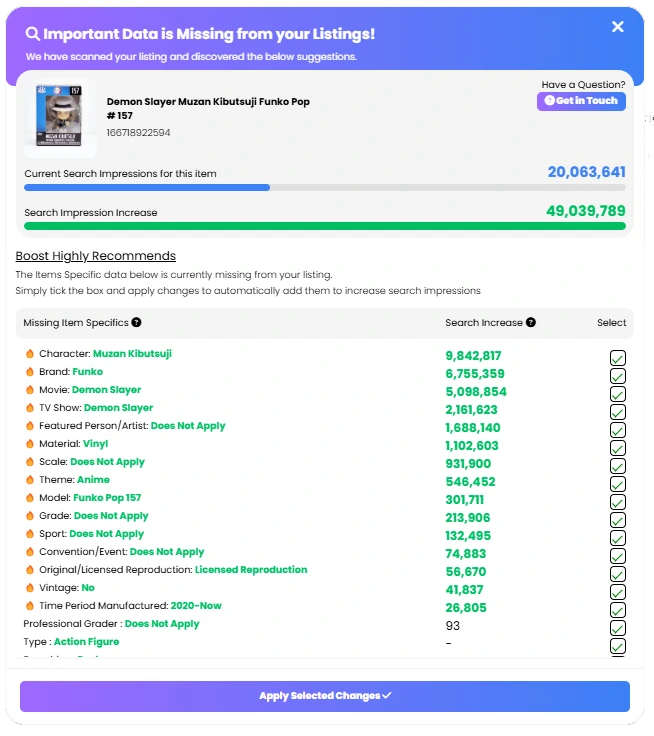
What to Do With Your Listing Health Report: Prioritising Fixes for Maximum Impact
Once you have your report, the temptation is to try to fix everything at once. For most sellers, that’s not realistic — especially if you’re managing hundreds or thousands of listings. Instead, use a prioritisation framework:
- Fix your worst-graded listings first (D and E grades). These have the most issues and therefore the most upside.
- Prioritise listings in your highest-selling categories. A 10% impression uplift in a category generating £5,000/month is worth far more than the same uplift in a category generating £500/month.
- Address Google Shopping rejections across all affected listings. This is often the fastest route to incremental sales because you’re unlocking an entirely new traffic channel, not just improving positioning within an existing one.
- Fix category compliance issues. These carry the highest risk — non-compliant listings can be removed from search without warning, so compliance is the floor before optimisation.
- Systematically work through item specifics gaps, starting with the most commonly filtered attributes in your categories (Colour, Size, Brand, Condition, Type).
For sellers who want to scale this work without dedicating internal resource to it, Frooition’s eBay bulk revision service and managed eBay SEO service handle the full implementation — rewriting titles, fixing item specifics, correcting categories, and resolving Google Shopping rejections across your entire catalogue. And if your listings need more comprehensive attention, eBay Listing Rescue is designed specifically for stores where performance has dropped and visibility needs to be recovered quickly.
eBay Item Specifics Are Not Set and Forget: Why Ongoing Monitoring Matters
One of the most important things to understand about eBay listing optimisation is that it isn’t a one-time task. eBay’s category requirements evolve continuously. New mandatory item specifics are introduced. Categories are restructured. Google Shopping feed requirements update.
A listing that earns an A grade today might fall to a C grade in three months if eBay introduces new required specifics in that category and you haven’t kept up. The sellers who maintain consistently high listing quality — and consistently high search visibility — are those who treat listing data as a live, ongoing concern rather than a setup task.
This means scheduling regular listing health checks, monitoring eBay’s seller communications for category requirement updates, and having a process for applying changes at scale. For high-volume sellers, this almost always means relying on professional tooling or managed services rather than manual processes. Frooition’s eBay SEO service includes ongoing compliance monitoring as part of the managed offering.
Frequently Asked Questions About eBay Item Specifics and Listing Performance
How many item specifics should I fill in?
All of them — required and recommended. Required specifics are mandatory for listing in most categories. Recommended specifics are optional from eBay’s perspective, but they are not optional from a visibility perspective. Every recommended specific you complete is an additional filter your listing becomes eligible for. Treat them as required.
Do item specifics affect my Google Shopping visibility, not just eBay search?
Yes — and this is one of the most underappreciated aspects of eBay listing optimisation. eBay automatically syndicates eligible listings to Google Shopping. Listings with complete, accurate item specifics (particularly GTINs, brand, and product condition) are far more likely to meet Google’s feed eligibility requirements and appear in Google Shopping results. Incomplete item specifics are a common reason for Google Shopping rejections.
My listings have been live for years — aren’t they already optimised?
Not necessarily. eBay’s item specifics requirements change regularly as the platform matures its product catalogue. A listing created two years ago was validated against requirements that existed at that time. If new mandatory or recommended specifics have been introduced in your category since then — and they almost certainly have — your listing is now missing data that it wasn’t missing when you created it.
How quickly will fixing item specifics improve my impressions?
Results vary depending on the severity of the gaps and the competitiveness of your category, but many sellers see measurable impression increases within days to a few weeks of completing item specifics. eBay recrawls and re-indexes listings relatively quickly, so the signal improvement from filling in missing specifics registers fast in Cassini’s ranking calculations.
The Bottom Line: Every Missing Item Specific Is a Sale You’re Not Making
eBay is a search-driven marketplace. Visibility is everything. And visibility is determined, in large part, by the quality and completeness of your listing data — especially your item specifics.
Most sellers have significant, fixable listing data problems that are quietly costing them impressions, clicks, and sales every single day. The good news is that these problems are entirely within your control — and identifying them takes minutes with the right tool.
The first step is knowing where you stand. Run a free eBay listing health check, see exactly which listings are underperforming and why, and start with the highest-impact fixes. The data is often eye-opening — and the results, for sellers who act on it, can be transformative.
Get Your Free eBay Listing Health Report
Find out which of your eBay listings are losing you sales — before your competitors do. Frooition’s free eBay Listing Checker analyses your entire catalogue against eBay’s current requirements, Cassini’s ranking signals, and Google Shopping’s eligibility criteria. Over 5,000 professional sellers have already used it. No credit card required. Report emailed within 2 minutes.