Share This Blog Post
InkFrog shut down on June 1, 2026. If you’d already migrated before then, this won’t apply to you — but if you didn’t, or if your live eBay listings still have InkFrog-hosted images or templates baked into them, here’s what’s actually happening now and how to fix it.
How to Check If You’re Affected
Open a handful of your live eBay listings and look for:
- Broken image icons where product photos should be
- Missing or garbled formatting in your listing description
- Any inventory sync connection to InkFrog (Shopify, BigCommerce, Amazon, or Wix) that’s no longer updating stock levels
If you see any of these, your listings are still depending on InkFrog infrastructure that no longer exists — and it’s very likely already affecting buyer trust and conversion on those listings right now.
What Happened When InkFrog Shut Down
InkFrog permanently shut down on June 1, 2026. This means:
- InkFrog accounts are now inaccessible
- Any eBay listing templates hosted or served by InkFrog’s CDN have stopped working
- Listings using InkFrog HTML templates are showing broken content or dead images to buyers
- Any inventory and listing data that wasn’t exported beforehand is gone
If your live eBay listings still use InkFrog-hosted templates or images, those listings are affected right now — which can quietly damage your store’s conversion rate and buyer trust for as long as it goes unfixed.
Step 1: Export Your InkFrog Listings as a CSV (If You Haven’t Already)
If you never got around to exporting your InkFrog listing library, it’s worth trying anyway — though InkFrog’s own dashboard access ended on June 1st, so this step may no longer be possible depending on your account status. If you already have a CSV export saved from before the shutdown, skip to Step 2.
- Log in to your InkFrog account at open.inkfrog.com
- Navigate to your Library from the main menu
- Select the listings you want to export – you can select all listings using the checkbox at the top of the list
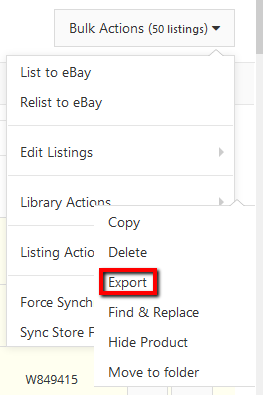
- Once at least one listing is selected, a Bulk Actions button will appear in the top right corner of your screen
- Click Bulk Actions → Library Actions → Export
- Choose to save the CSV file directly to your computer
If you already have your CSV saved, your listing data — titles, descriptions, pricing, item specifics, and more — is preserved locally and ready to migrate.
⚠️ A CSV Export Alone Won’t Fix Broken Images
A CSV saves your listing data, but image URLs in a CSV aren’t the same as saved image files. If InkFrog’s CDN is already offline, those URLs won’t resolve either way — the fix is rehosting the images themselves, not just the data.
Step 2: Fix Your Live eBay Listings Now
If your live eBay listings still contain InkFrog HTML templates — with images or styling hosted on InkFrog’s own servers — those listings are broken right now, not at some point in the future.
Broken eBay listings mean:
- Missing images in your product descriptions
- Broken HTML layouts visible to buyers
- A damaged brand image and a real drop in conversions
- Possible eBay policy issues related to broken external links in listings
Frooition can strip all InkFrog template code from your live eBay listings and rebuild them properly — fixing the disruption rather than just documenting it.
Why Did InkFrog Close?
InkFrog never gave a public reason for the shutdown — the announcement email simply described it as a “difficult decision” and “the right step forward.” The closure was final: there was no acquisition, no rollover product, and no extension offered. The more useful question now is how to fix what broke, not why it happened.
What Actually Broke on June 1st
InkFrog’s own shutdown email made the situation sound simpler than it turned out to be for a lot of sellers. Here’s what many sellers didn’t fully account for.
The CSV export never covered everything
InkFrog’s export only ever gave sellers a CSV of listing data — useful, but it never included:
- Master profiles, listing profiles, payment, shipping, and return profiles — years of operational setup
- Your image library hosted on inkfrog.com
- Your multi-channel sync mappings between eBay and Shopify, BigCommerce, Amazon, or Wix
- Your bulk revision rules and saved bulk operations
The listings themselves were exportable. Replicating the actual workflow on a new platform was always the bigger job — and still is, for anyone who hasn’t done it yet.
The silent killer: listing images
This is the issue most affected sellers still haven’t noticed. Every live eBay listing that references images hosted at imgs.inkfrog.com is affected.
Since InkFrog decommissioned its image hosting infrastructure on June 1st, those URLs return errors. The live eBay listings themselves haven’t disappeared — but the images inside them have. eBay listings without product images convert at a fraction of normal rates, and sellers can lose the majority of their conversion without ever realising why their numbers dropped.
If this hasn’t been fixed yet, it needs to happen now.
Multi-channel inventory sync is broken
If you were using InkFrog to keep eBay inventory levels in sync with Shopify, BigCommerce, Amazon, or Wix, that connection ended on June 1st. Since then, a sale on one channel hasn’t been automatically depleting stock on the others — meaning any seller who hasn’t already moved that sync to a new tool has likely been overselling without realising it.
The real cost of not migrating properly
A typical InkFrog seller with 1,000+ active listings who hasn’t migrated properly is likely dealing with some combination of:
- Listings that are visually broken due to image hosting failure
- Overselling caused by broken multi-channel sync
- Loss of the workflow setup that made them efficient
- eBay seller performance metrics dropping due to defect rates from cancellations
Fixing this now — not continuing to leave it — is what stops all four from compounding further.
Step 3: Migrate to Frooition – Free for InkFrog Sellers
Frooition is an eBay Certified Partner and one of the most trusted eBay listing and inventory management platforms available. We built a dedicated migration path specifically for InkFrog sellers, and we’re still handling it completely free of charge for anyone who hasn’t migrated yet.
How to Get Started
- Visit https://www.frooition.com/inkfrog/
- Create your free Frooition account – no credit card required
- Open a support ticket (guide) and upload your InkFrog CSV export if you have one — if not, let the team know and they’ll advise on next steps for recovering what’s needed directly
- Our eBay migration team will take it from there
That’s all you need to do. Frooition’s migration team – not an automated system, but real eBay experts – will handle the full data migration for you.
What’s Included in the Free InkFrog Migration
Here’s exactly what Frooition will do for you as part of the free migration:
Frooition’s Free InkFrog Migration Includes:
- ✓ Full import of your InkFrog CSV data into your Frooition account
- ✓ Recovery and migration of your images into your Frooition account, wherever they’re still accessible
- ✓ Backup of your live eBay listings into Frooition’s eBay software
- ✓ Removal of all InkFrog template code from your live eBay listings
- ✓ All listing and inventory data securely stored in Frooition – no ongoing disruption to live listings
As our team puts it:
From the Frooition Migration Team:
“We can migrate your InkFrog inventory and product data from InkFrog into Frooition’s eBay software. Which also includes recovering the images wherever they’re still accessible – copying them into your Frooition eBay account. Meaning all listing and inventory data (including images) are all backed up and secure on Frooition.
We can also back up your live eBay listings into your Frooition eBay account. And we can remove the InkFrog templates and code from your live eBay listings, to ensure your listings are no longer broken due to a dead eBay template.
All of the above is included for free to help InkFrog sellers get their business and selling back to normal, without further disruption.”
What You Get with Frooition – 7 Days Free
When you create your free account through https://www.frooition.com/inkfrog/, you’ll get 7 days free access to the full Frooition platform. Here’s what’s included:
- eBay Inventory Management – unlimited listings
- Full eBay Backup
- eBay Listing Tool
- eBay End & Re-Lister
- 25 Auto Fix Optimization Credits per Month
- Full Optimization Reports
- Bulk Revision
- Hot Product Finder
- Unlimited Manual Optimizations
- Unlimited Listings
- 600+ Listing Templates to Choose From
- Dedicated Support
- Unlimited Media Hosting
Need a new eBay listing template to replace your old InkFrog design? Frooition offers 600+ professionally pre-designed eBay listing templates, as well as fully custom template design options. Just let the team know when you open your support ticket.
Why Frooition is the Best InkFrog Alternative for eBay Sellers
Frooition isn’t just a like-for-like replacement for InkFrog – it’s an upgrade. Here’s how the two platforms compare for active eBay sellers:
| Feature | InkFrog | Frooition |
|---|---|---|
| eBay Listing Management | ✗ (Closed) | ✓ Unlimited |
| eBay Templates | ✗ (Hosted – now broken) | ✓ 600+ Professionally Designed & Custom Designed Packages |
| eBay Inventory Backup | ✗ Gone | ✓ Full Backup |
| SEO Optimization Tools | ✗ Gone | ✓ Auto Fix + Full Reports |
| Image Hosting (CDN) | ✗ Offline | ✓ Unlimited, Secure Hosting |
| Bulk Listing Revisions | ✗ Gone | ✓ Full Bulk Revision |
| End & Re-Lister | ✗ Gone | ✓ |
| Dedicated eBay Support | ✗ Gone | ✓ In-house eBay Expert Team |
| Status | ✗ Closed June 1, 2026 | ✓ Active & Growing |
Frooition is a fully managed eBay platform with a dedicated team of eBay experts – not a self-service tool. That means your migration is handled professionally, and your eBay store is in experienced hands from day one.
Frequently Asked Questions
Is the InkFrog migration to Frooition still free?
Yes. The full migration – including data import, image recovery, eBay listing backup, and InkFrog template removal from live listings – is completely free for InkFrog sellers, whether or not you migrated before the shutdown. You also get 7 days free access to the full Frooition platform.
Did InkFrog actually shut down?
Yes. InkFrog confirmed via email to all customers on April 29, 2026, that the service would shut down on June 1, 2026 — and it did. Listing data export was available until May 31 via the “Export All Listings” button on the dashboard, but that window has now closed.
Why did InkFrog shut down?
InkFrog never shared a public reason beyond describing it as a difficult decision. The closure was final — there was no acquisition, no rollover product, and no extension offered.
What happened to my InkFrog eBay listings?
Your live eBay listings continue to exist — eBay holds the listings, not InkFrog. However, any images hosted on imgs.inkfrog.com went offline when InkFrog decommissioned its infrastructure, leaving affected listings without product photos. Multi-channel sync also stopped working for anyone who hadn’t already moved it elsewhere.
Can I still export my listings from InkFrog?
InkFrog’s export window closed on May 31, 2026, and dashboard access ended on June 1st. If you already have a CSV saved from before then, you’re set for the listing-data side of things. If not, contact Frooition’s team directly — they can advise on what’s still recoverable.
Did InkFrog refund unused billing?
InkFrog confirmed automatic refunds for unused days remaining in billing cycles, calculated on a daily basis and returned to the original payment method after the service closed.
What happened to my images when InkFrog shut down?
Any product images hosted on InkFrog’s CDN (imgs.inkfrog.com) stopped loading once InkFrog’s servers went offline. As part of the free Frooition migration, we recover what’s still accessible and copy it into your Frooition media library — so your live listings can be restored to visually intact.
What happened to my multi-channel sync?
If InkFrog was syncing your eBay inventory with Shopify, BigCommerce, Amazon, or Wix, that connection ended on June 1st. Frooition’s migration service includes remapping all your multi-channel sync connections to get inventory accurate again across every platform.
Do I need to be technical to migrate from InkFrog to Frooition?
No. Open a support ticket with Frooition — with your CSV if you have one — and the eBay experts on Frooition’s migration team handle everything else.
How long does the Frooition migration take?
Image recovery and basic template setup typically takes 5–7 business days. A full custom template rebuild takes 10–15 business days.
Is there a like-for-like InkFrog replacement?
Frooition covers everything InkFrog offered — listing management, image hosting, bulk revision, end and relist, and multi-channel sync — plus custom eBay templates, AI listing optimisation, and a dedicated team of in-house eBay experts. You also get 7 days free to evaluate the platform properly before any payment is taken.
Does the 7-day free offer have a catch?
No. Seven days from migration go-live, no payment required during that window, no obligation to continue afterward. If at the end of 7 days you decide not to continue, you walk away with your migrated setup intact.
Can I get a new eBay listing template as part of the migration?
Yes. Frooition offers 600+ professionally designed eBay listing templates, and fully custom design options are also available. Mention it when you open your support ticket and the team will discuss the best option for your store.
Fix Your Broken InkFrog Listings — Free Migration Still Available
InkFrog closed on June 1, 2026. If you haven’t already exported your data and secured a new home for your eBay listings, the good news is it’s not too late to fix what’s broken.
Your Next Steps:
- 1. Export your InkFrog listings as a CSV if you haven’t already and still can (see Step 1 above)
- 2. Visit frooition.com/inkfrog and create your free account
- 3. Open a support ticket and upload your CSV if you have one – the migration team handles the rest
Frooition’s team of eBay experts will migrate your InkFrog data, images, and listings across to Frooition – fixing broken listings and getting your eBay store back to trading properly.
Start your free migration at https://www.frooition.com/inkfrog/
Share This Blog Post
Related Posts
Thanks! We'll be in touch within one business day.