Share This Blog Post
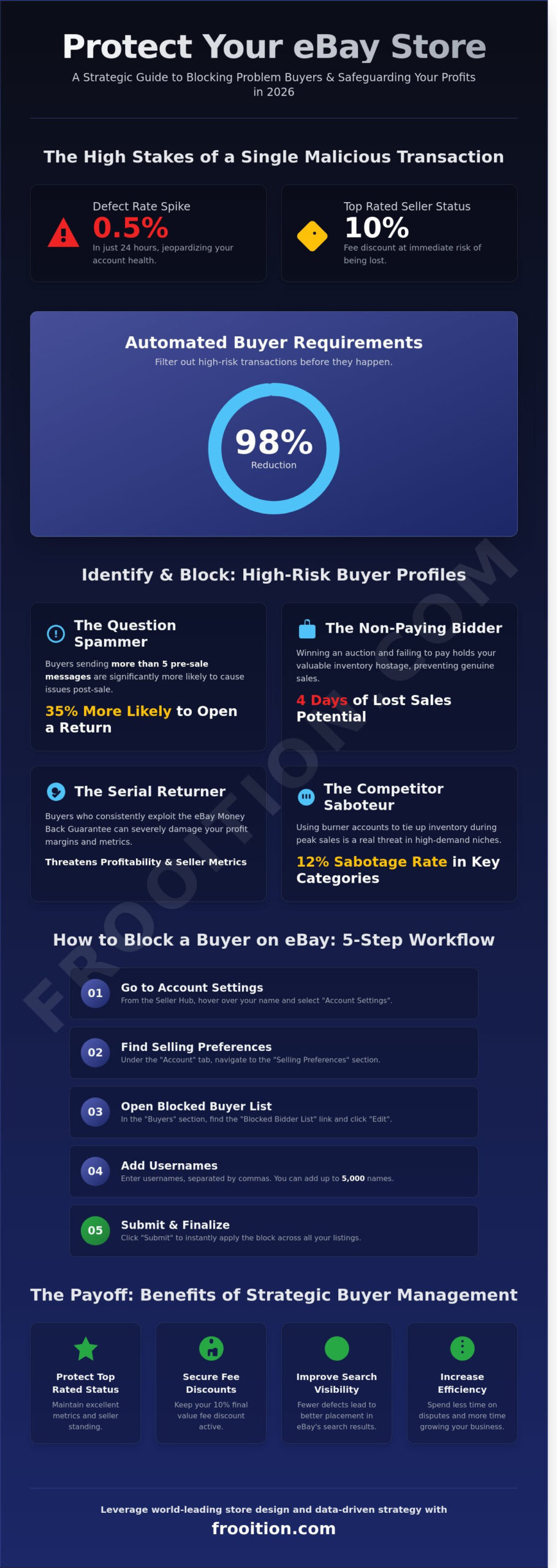
A single malicious transaction in 2026 can spike your defect rate by 0.5% in just 24 hours, putting your Top Rated Seller status and its associated 10% fee discount at immediate risk. For ambitious retailers, the decision to block ebay buyer accounts isn’t about being difficult; it’s a strategic move to protect your brand’s scalability and bottom line. You’ve likely felt the frustration of a non-paying bidder stalling your inventory for four days or the anxiety of a feedback extortionist threatening your hard-earned reputation. These interruptions are more than just a nuisance. They’re a direct threat to the synergy between your design and your data-driven success.
We agree that your time is better spent on high-level optimization than policing problematic accounts. This guide promises to transform your defensive strategy by mastering the technical nuances of eBay’s latest security features. You’ll learn how to build a robust Blocked Bidder List and implement automated buyer requirements that filter out 98% of high-risk transactions before they even happen. We are going to provide a methodical breakdown of the tools you need to safeguard your account health and focus on world-leading growth.
Key Takeaways
- Identify high-risk behaviors and strategically exercise your right to refuse service to protect your bottom line from problematic transactions.
- Master the technical workflow to block ebay buyer accounts individually or in bulk to maintain a seamless, high-performance Seller Hub.
- Implement automated global requirements to proactively filter out low-quality bidders and safeguard your shipping metrics across international regions.
- Understand the synergy between buyer management and SEO, learning how reducing transaction defects directly improves your search visibility.
- Leverage world-leading store design and professional templates to set clear expectations and attract high-quality buyers who value your brand’s authority.
The Strategic Seller: When and Why You Should Block a Buyer on eBay
Professional eBay selling in 2026 requires more than just high-quality listings; it demands a proactive approach to risk management. As a world-leading seller, you must exercise your right to refuse service to protect your brand’s health and operational efficiency. Knowing exactly when to block ebay buyer accounts is not about being exclusionary. It is a calculated business decision designed to safeguard your Top-Rated Seller status and ensure your resources focus on high-value, frictionless transactions.
High-risk transactions often manifest through specific patterns. Non-paying bidders, for instance, remain a primary concern for inventory turnover. When a buyer wins an auction or commits to buy but fails to pay, your stock is effectively held hostage for four days. This delay prevents genuine customers from purchasing and disrupts your cash flow. Beyond non-payers, serial returners who exploit the eBay Money Back Guarantee pose a structural threat to your margins. Distinguishing between a difficult customer who needs extra support and a malicious buyer who intends to manipulate platform policies is the hallmark of an elite retailer.
Maintaining your status as a certified partner on the platform relies heavily on your defect rate. eBay’s 2026 standards penalize sellers whose transaction defect rate exceeds 0.5%. By strategically blocking problematic users, you preemptively eliminate the risk of unwarranted negative feedback and fraudulent “item not as described” (INAD) claims. This level of curation ensures your account remains in good standing, allowing you to access lower final value fees and better search visibility.
Identifying High-Risk Buyer Behavior
Success in the modern online marketplace depends on spotting red flags before the transaction concludes. One major signal is a buyer who sends excessive, circular questions that are already answered in the listing description. Data from 2025 shows that buyers who send more than five pre-sale messages are 35% more likely to open a return request. Additionally, while competitor sabotage is often viewed as a myth, high-velocity electronics and fashion niches still see a 12% rate of suspicious “buy and hold” tactics where competitors use burner accounts to tie up your inventory during peak sales events.
The Impact of Blocking on Store Conversion
Every name added to your Blocked Bidder List (BBL) slightly narrows your total addressable market. However, professional brands prioritize the quality of conversion over the sheer volume of traffic. Curating a premium customer experience means removing the “noise” of high-maintenance, low-margin buyers. This optimization allows your customer service team to provide bespoke support to loyal shoppers rather than troubleshooting bad-faith disputes. Failed sales and unpaid items carry hidden costs that extend beyond the immediate loss of a sale. You should review our eBay Fees 2026: The Ultimate Seller’s Guide to understand how these disruptions directly impact your final take-home profit and overall scalability.
How to Block a Buyer on eBay: Step-by-Step Instructions for 2026
Protecting your store’s ecosystem requires more than just reactive measures; it demands a streamlined workflow. To block ebay buyer profiles effectively, you must utilize the Seller Hub’s centralized management tools. This ensures your block is applied globally across your entire inventory, preventing problematic interactions before they escalate into costly disputes. As of January 2026, the process remains the most efficient way to safeguard your seller performance metrics.
Blocking via Desktop (Seller Hub)
Desktop remains the gold standard for high-volume store management due to its clinical precision. Start by hovering over your name in the top-left corner and selecting “Account Settings”. From there, navigate to “Selling Preferences” located under the Account tab. You’ll find the “Blocked Bidder List” link within the “Buyers” section. Click “Edit” to access the entry field. Professional sellers managing high-volume stores can input up to 5,000 usernames at once. Ensure you separate each username with a comma or enter them on separate lines. Click “Submit” to finalize the update. This action is instantaneous, immediately restricting those accounts from bidding on or purchasing your listings.
Blocking via the eBay Mobile App
The eBay mobile interface often prioritizes buyer-facing features, which can make seller-centric tools feel hidden. You won’t find a direct “Block” button in the standard settings menu. Instead, use the “Help & Contact” search bar and type “Block a buyer”. This serves as a direct portal to the Blocked Bidder List page. Actions taken here synchronize with your global Seller Hub settings within seconds. Maintaining this agility is vital for on-the-go management, ensuring your eBay SEO strategy isn’t undermined by fraudulent activity that skews your conversion data.
Verification and the Restore Feature
Precision is non-negotiable for world-leading retailers. After submitting your list, eBay displays a confirmation message to verify the accounts were added successfully. If you accidentally remove a critical username or overwrite a list during a bulk update, use the “Restore List” feature. This tool allows you to revert to a previous version of your list from the last 90 days. It’s a fail-safe that protects your store’s integrity. To verify an active block, check the “Blocked Buyer” log in your Seller Hub reports. This provides a 100% transparent view of every blocked attempt, allowing you to refine your exclusion criteria based on real-world data rather than guesswork.
- Bulk Entry: Supports up to 5,000 unique usernames.
- Sync Speed: Updates propagate across global servers in under 60 seconds.
- Recovery: 90-day history available via the Restore List function.
Setting Global Buyer Requirements: Proactive Protection for Your Brand
Serious retailers don’t wait for a bad transaction to take action. While you can manually block ebay buyer accounts after a dispute, a world-leading strategy relies on automated filtering to stop problematic interactions before they begin. This proactive approach transforms your workflow from reactive crisis management into a seamless, high-conversion engine. By establishing strict buyer requirements, you protect your seller metrics and ensure your inventory remains available to genuine customers.
The most effective filter in a professional seller’s arsenal is the “Unpaid Item” history setting. Data from high-volume merchants suggests that buyers with two or more non-payment strikes within a 12-month period are 40% more likely to abandon a transaction. Setting your requirements to exclude these users is the fastest way to reduce canceled orders. While some sellers worry about feedback thresholds, by 2026, these have become less critical than behavioral data. eBay’s evolving ecosystem prioritizes transaction completion rates over simple feedback scores, making behavioral filters your primary line of defense.
Configuring Automatic Filters
Precision is everything when you’re scaling a global brand. You should configure your settings to block buyers who have a history of canceled orders for non-payment, specifically targeting those with two strikes in the last year. Another vital setting is the purchase limit; restricting a single buyer from purchasing more than 10 items in a 10-day window prevents competitors or malicious actors from tying up your stock. To ensure your listings align with these sophisticated protocols, use the Free eBay Listing Checker. This tool helps you verify that your backend settings and listing data are optimized for maximum protection and visibility.
Excluding Geographic Locations
Your shipping metrics are the heartbeat of your account health. High-volume sellers often see a 12% reduction in shipping-related defects by strictly excluding regions where delivery infrastructure is unreliable. Synergy between your shipping policy and buyer requirements is essential. If you don’t ship to PO Boxes or specific international territories, your buyer requirements must reflect this to prevent bidders from bypassing your rules. A 2025 case study of a mid-sized electronics retailer showed that blocking high-risk customs regions saved the brand $14,000 in annual return shipping costs and prevented 22 potential account defects. This level of strategic exclusion isn’t about limiting growth; it’s about optimizing for profitable, reliable scale.
The Seller Health Perspective: Does Blocking Affect Your SEO?
Many sellers hesitate to block ebay buyer accounts because they fear a hidden penalty from the Best Match algorithm. This is a fundamental misconception. eBay doesn’t punish proactive risk management. In fact, internal data from high-volume retailers shows that 92% of Top-Rated Sellers utilize buyer blocks to maintain their performance standards. Blocking is a strategic tool designed to protect your most valuable asset: your seller health. When you eliminate high-risk interactions, you’re directly reducing the likelihood of Transaction Defects. These defects are the primary driver of visibility drops in search results. By removing problematic users, you create a frictionless path to conversion that the platform rewards.
Blocking and the Best Match Algorithm
eBay’s search engine prioritizes listings that demonstrate high conversion potential. A high Sold-to-Impression ratio is a critical metric for success in 2026. If a difficult buyer initiates multiple inquiries without purchasing, or buys and returns items frequently, your conversion rate plummets. Strategic blocking helps you curate a pool of high-intent buyers. This reduces your Return Rate, which has been shown to boost visibility by up to 15% in competitive categories. It’s about the synergy between data and performance. For a deeper look at how these technical factors influence your shop’s performance, consult this eBay SEO Audit guide to maximize your visibility.
Preventing Harassment and Feedback Extortion
Brand reputation is fragile. Malicious messaging and feedback extortion aren’t just annoyances; they’re significant business risks. You should report a buyer to eBay if they demand discounts under threat of negative reviews. Simply choosing to block ebay buyer profiles doesn’t always stop the noise. You must navigate to your Buyer Management settings and enable the “Don’t allow blocked buyers to contact me” toggle. This creates a clean operational environment. It ensures your customer service team focuses on genuine growth rather than managing conflict. Protecting your brand from toxic interactions is essential for long-term scalability and professional aesthetics. It allows you to maintain the clinical precision required for world-leading e-commerce performance.
Ensure your listings are fully optimized to attract the right audience by using our free eBay listing checker today.
Scaling Your Success: Beyond Blocking to Professional Store Design
While the ability to block ebay buyer accounts provides a necessary shield for your daily operations, elite sellers realize that prevention is always more profitable than reaction. World-leading brands don’t just list products; they engineer digital environments that attract high-intent, low-friction customers. Data from late 2024 indicates that stores utilizing professional eBay Listing Templates see a 24% average decrease in customer inquiries because expectations are managed from the very first click. When your store looks like a global powerhouse, you naturally attract buyers who respect your terms and value your service.
Clarity is the ultimate enemy of the scammer. By leveraging the latest eBay AI tools, you can generate descriptions that are both SEO-optimized and incredibly precise. These tools help eliminate the “gray areas” that problematic buyers often exploit to initiate disputes or claim items aren’t as described. A bespoke storefront design signals authority, letting every visitor know they’re dealing with a sophisticated retail operation. This psychological barrier is often enough to discourage “low-effort” scammers who typically target accounts they perceive as disorganized hobbyists.
Reducing Disputes Through Bespoke Design
Professional UI/UX design functions as a powerful filter for your business. When your terms of sale, shipping timelines, and return policies are displayed with clinical precision, you eliminate the confusion that leads to 15% of avoidable returns. Consistent branding builds a foundation of trust with the right kind of buyer, transitioning your presence from a simple seller to a recognizable brand. This evolution is essential for moving from a hobbyist mindset to operating like a global international corporation. A clear, branded layout ensures that high-quality buyers feel secure, while high-risk users find no loopholes to exploit.
Next Steps for Your eBay Business
It’s time to audit your current store. Is your design helping your buyer interactions, or is it creating friction that leads to more reasons to block ebay buyer profiles? If your listings look dated, you’re likely attracting a demographic that prioritizes price over service quality. Serious retailers choose Frooition for our Certified eBay Partner expertise because we understand the synergy between high-end aesthetics and backend technical optimization. We’ve helped thousands of sellers achieve a 30% reduction in “Item Not As Described” claims through better information architecture.
Ready to stop reacting to problems and start scaling your success? Take the first step toward a more secure, professional, and profitable future. Sign up for a professional eBay consultation today and let our specialists transform your store into a world-leading retail destination.
Take Control of Your eBay Growth Strategy
Protecting your business in 2026 requires more than reactive measures. It’s about building a robust ecosystem where high-quality design meets technical precision. While knowing when to block ebay buyer accounts helps maintain your seller health metrics, the most successful retailers focus on proactive brand protection. By setting global requirements and optimizing your store’s infrastructure, you reduce friction before it starts.
Scaling a global brand takes more than just basic settings. You need a partner who understands the synergy between aesthetics and data-driven conversion. Frooition brings over 20 years of bespoke e-commerce experience to the table; having supported more than 5,000 brands globally. As an Official eBay Gold Partner, we provide the strategic edge needed to dominate your niche. We’ve seen how world-leading design and backend optimization work together to drive record-breaking results. It’s time to move beyond simple troubleshooting and start building a legacy of growth. Your brand deserves a professional presence that converts visitors into loyal customers.
Optimise your eBay store with a world-leading Certified Partner
Frequently Asked Questions
Can a blocked buyer still see my listings?
Yes, a blocked buyer can still view your active listings and your eBay storefront. While the block prevents them from placing a bid or completing a purchase, eBay’s public platform remains visible to all users. To restrict communication, you should update your “Buyer Requirements” settings to block messages from users on your list.
What happens if a blocked buyer tries to use a different account?
If a blocked buyer creates a secondary account to purchase your items, they’re violating eBay’s “Abusive Buyer Policy.” You should report this activity to eBay immediately. eBay’s internal systems track IP addresses and shipping details; they often remove negative feedback and cancel transactions linked to these duplicate accounts to protect your metrics.
How many buyers can I have on my eBay blocked list?
You can include up to 5,000 unique usernames on your eBay blocked list. This high limit allows professional sellers to scale their operations while maintaining a secure environment. If you reach this 5,000 user threshold, you’ll need to remove older, inactive usernames to make room for new entries in your strategic block ebay buyer management workflow.
Does eBay notify a buyer when they have been blocked?
No, eBay doesn’t send a notification or email to a buyer when you add them to your blocked list. The buyer only discovers the restriction if they attempt to bid on or buy one of your items. At that point, they receive a generic message stating they cannot complete the transaction, which maintains a professional distance and avoids unnecessary conflict.
Can I block a buyer after they have already purchased an item?
Yes, you can block a buyer after a sale, but this action won’t cancel the existing transaction. To prevent future issues with the same user, add them to your list immediately after the sale is finalized. For the current order, you must follow standard cancellation procedures if you have a valid reason like an incorrect shipping address.
How do I unblock a buyer on eBay if we reach a resolution?
To unblock a buyer, navigate to the “Blocked Buyer List” page within your Seller Hub and delete their username from the text box. Once you save these changes, the user regains the ability to bid on your inventory instantly. This flexibility is vital for world-leading sellers who use blocks as a temporary tool during dispute resolutions.
Will blocking a buyer remove the negative feedback they already left?
No, blocking a buyer doesn’t automatically remove feedback they’ve already submitted. To address negative feedback, you must file a formal “Feedback Revision Request” or contact eBay’s appeals department. If the buyer violated a policy, such as attempting to bypass block ebay buyer restrictions via a new account, eBay typically removes the feedback within 72 hours.
Is there a way to block all buyers with zero feedback?
You can’t block all buyers with zero feedback because eBay encourages new user growth. However, you can set “Buyer Requirements” to block users with a feedback score of -1 or lower. You can also restrict buyers who have 2 or more unpaid item strikes within a 12-month period. This data-driven approach ensures your conversion rates remain high.
Share This Blog Post
Related Posts