
What is Terapeak? The Complete Guide to eBay Product Research
Terapeak is now built into eBay Seller Hub — free for every seller. Here's exactly how to use it to find what's selling, price your listings correctly, and leave the competition behind.
What is Terapeak?
Terapeak is eBay's market research tool. Originally a third-party analytics company, eBay acquired Terapeak in 2017 and gradually folded it into Seller Hub — making it the most powerful built-in research resource available to eBay sellers, at no extra cost.
In May 2024, eBay officially retired the Terapeak brand name. The tool is now simply called Product Research inside Seller Hub, with its companion tool renamed from "Terapeak Sourcing Insights" to just Sourcing Insights. But most sellers — and most search queries — still use the Terapeak name, and the functionality is exactly the same.
If you're looking for "Terapeak" inside eBay and can't find it: go to Seller Hub → Research tab → Product Research. That's it. Same tool, new name.
At its core, Terapeak answers three questions every eBay seller needs to know:
- What to sell — which products have proven demand on eBay
- When to sell — seasonal trends and demand cycles
- How much to sell for — actual transaction prices, not just asking prices
It does this by analyzing up to 3 years of real eBay transaction data — millions of sold listings — and presenting it in charts, tables, and metrics you can act on immediately.
"Terapeak doesn't tell you what might sell. It tells you what already has sold, and for how much."
Is Terapeak free?
Yes — with one important distinction. There are two tools, and they have different access requirements:
- Search any product or keyword
- Up to 3 years of sold listing data
- Average and actual sold prices
- Sell-through rate
- Number of sellers and listings
- Seasonal trend charts
- Best Offer accepted prices
- Desktop and mobile app
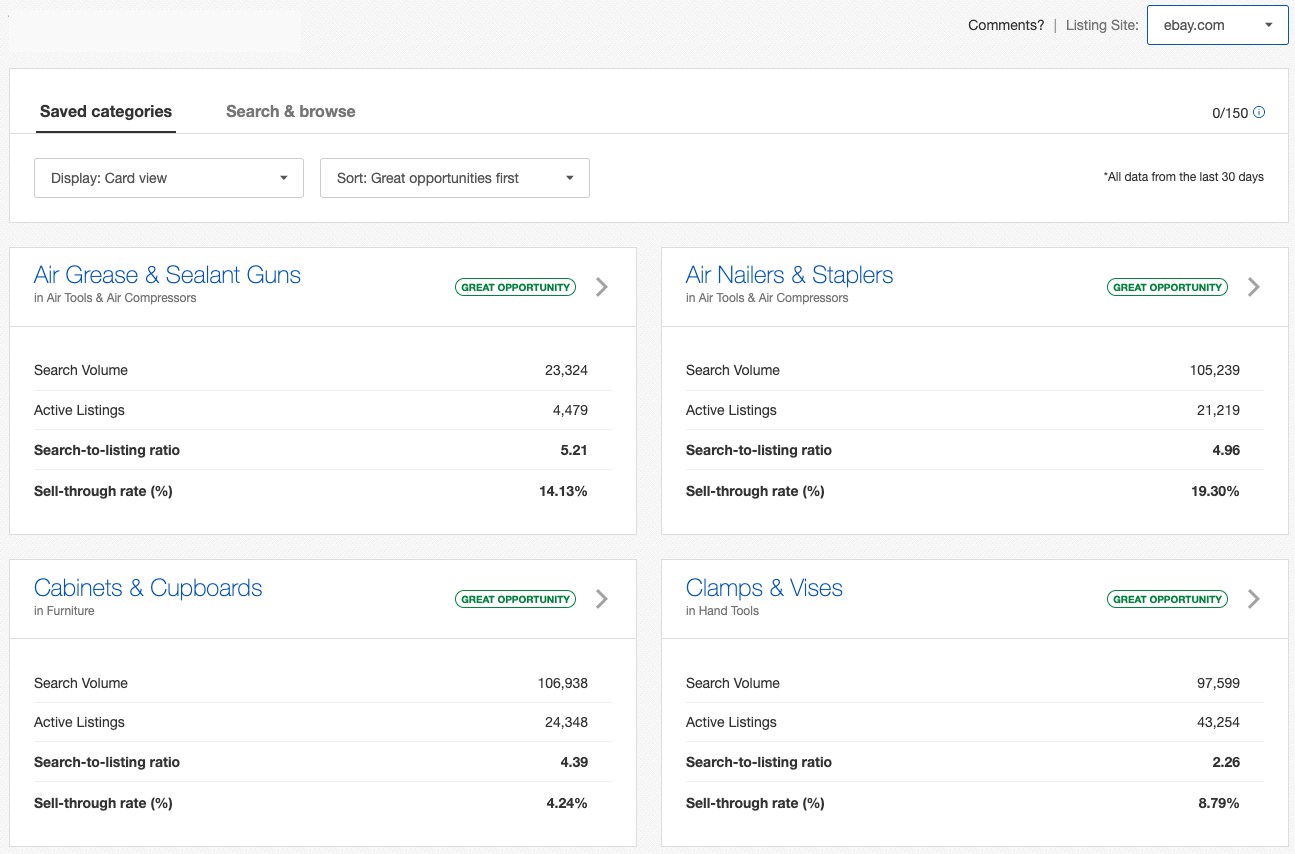
- Category-level demand analysis
- High demand / low supply categories
- Supply gap identification
- Inventory planning by category
- Trending category alerts
- From ~$21.95/mo (US) or ~£19.99/mo (UK)
For most sellers, the free Product Research tool covers the vast majority of daily use cases. Sourcing Insights is most valuable if you're actively looking to expand into new product categories and want category-level data to guide that decision.
How to access Terapeak in eBay Seller Hub
There are three ways to get to Terapeak (Product Research), depending on your device:
Go to seller.ebay.com. Click the Research tab in the top navigation bar. Select Product Research from the left sidebar. Sourcing Insights appears directly below it if you have a qualifying store subscription.
Open the eBay app on iOS or Android. Tap the Selling tab. Scroll to Seller Tools and tap Product Research. The mobile version added barcode scanning in 2024 — point your camera at any product barcode and get instant sold data. Invaluable for sourcing at garage sales, thrift stores, or wholesalers.
Navigate directly to ebay.com/sh/research. You'll need to be logged into a Seller Hub-enabled account.
eBay's standard "Sold Listings" filter on the main search only goes back 90 days. Terapeak Product Research gives you up to 3 years of data — critical for seasonal items, slow-moving categories, or products that sell only a few times per month.
What data does Terapeak show?
Once you run a search, Terapeak returns a dashboard of metrics across several tabs. Here's what each one means and how to use it:
The Unsold Listings tab is underused but enormously valuable. It shows listings that didn't sell — helping you understand whether failure was due to price, title keywords, listing quality, or lack of demand. Always check unsold data as carefully as sold data before listing anything new.
Product Research vs. Sourcing Insights: What's the difference?
Both tools live under the Research tab in Seller Hub, but they answer very different questions.
| Question | Product Research | Sourcing Insights |
|---|---|---|
| "How much should I price this specific item?" | ✓ Yes | — |
| "Is there demand for this product right now?" | ✓ Yes | — |
| "Which keywords should I use in my title?" | ✓ Yes | — |
| "Should I sell auctions or fixed price?" | ✓ Yes | — |
| "Which entire product categories are trending?" | — | ✓ Yes |
| "Where is demand high but supply low across eBay?" | — | ✓ Yes |
| "What should I stock next quarter?" | — | ✓ Yes |
How to use Terapeak step by step
A practical walkthrough for evaluating a new product or validating an existing listing.
Search by keyword, UPC barcode, ISBN, or MPN. Use the specific product name rather than a broad category. "Levi 501 jeans W32 L32" gives far more actionable data than "jeans". Multiple keywords are treated as AND — all words must appear in the listing.
Start with the last 90 days for a current market snapshot, then extend to 1 year to spot seasonality. For rare or low-volume items, use the maximum range to gather enough data points.
Before you look at pricing, check whether the product actually sells. Under 20% means most listed items don't find a buyer. Under 10%? Proceed with caution. Above 50%? Supply isn't meeting demand — a strong signal to list.
The average sold price is your benchmark — not your target price. Check the price range too. Look at the Sellers tab to see what top performers are doing differently. And crucially, check the Best Offer accepted prices — these reveal what buyers are actually willing to pay when negotiating.
A product that looks slow today might be seasonal. The revenue trend chart shows peaks and valleys clearly. Time your listings to align with rising demand, not falling demand.
Click through the unsold listings and compare them to the sold ones. Are unsold listings priced significantly higher? Using different keywords in the title? Not offering free shipping? The gap between sold and unsold tells you exactly what to replicate — and what to avoid.
Using Terapeak for eBay keyword research
One of the most underrated uses of Terapeak is keyword research. The titles of top-performing sold listings are a goldmine of keywords that eBay's Cassini search engine has already rewarded with visibility and conversion. Once you have your shortlist, our eBay keywords guide shows where each one belongs in your title and item specifics.
How to extract keywords from Terapeak data
- Sort sold listings by highest price — top-performing listings have usually nailed both keywords and presentation. Study their title structure carefully.
- Note repeated words across multiple sold listings — if "vintage," "original," "signed," or a specific model number appears in most sold listings but not your current title, add it.
- Look for spec-level keywords — size, color, material, year, model, condition. eBay buyers often search at a very specific level.
- Compare keyword patterns in sold vs. unsold titles — this directly shows you which words are converting and which aren't.
Try multiple keyword variations for the same product. "Nike Air Max 90" vs. "Air Max 90 Nike" vs. "Air Max 90 sneakers." The variation with the highest sell-through rate is how your target buyers actually search. Use that phrasing in your listing title.
For higher-volume sellers managing large catalogs, this keyword research process is time-consuming at scale. This is where Frooition's eBay SEO service can help — integrating keyword optimization and title rewriting across your entire inventory, tuned specifically for Cassini's ranking signals.
Using Terapeak to price your listings
Pricing is where Terapeak delivers its clearest commercial value. Four specific scenarios where it changes the outcome:
1. Pricing a new listing in an unfamiliar category
Run a Terapeak search, note the average sold price, check the price range, and look at condition breakdowns. Price slightly below the average to move stock initially, then adjust upward once you have feedback and search rankings established.
2. Deciding between auction and fixed price
Terapeak breaks down sell-through rates by listing format. For items with consistent demand — commoditized products, new goods, consumables — fixed price typically outperforms auctions. For rare, collectible, or hard-to-value items, auctions can drive prices significantly above the fixed-price average. The data will tell you which applies to your product.
3. Setting Best Offer thresholds
Because Terapeak reveals the actual accepted prices on Best Offer transactions, you can see the real spread between asking price and what sellers actually accepted. This lets you set realistic auto-accept and auto-decline thresholds — rather than guessing.
4. Reviewing underperforming listings
If a listing has been live for 30+ days with no sale, run a Terapeak search on your item. If the sell-through rate is healthy but your listing still isn't converting, the problem is your price, title, images, or description — not lack of demand. Terapeak tells you which problem to solve first.
Never price against active listings. Active listings show what sellers are asking — not what buyers are paying. Always price relative to sold data. This is the single most common pricing mistake on eBay, and Terapeak gives you the right data to avoid it.
Terapeak limitations — and how to work around them
Terapeak is powerful, but it isn't perfect. Understanding its limitations stops you from drawing the wrong conclusions.
| Limitation | Why It Matters | Workaround |
|---|---|---|
| eBay-only data | Doesn't show demand from Amazon, Etsy, or other platforms | Use Google Trends for overall category demand; Terapeak for eBay-specific decisions |
| Sell-through hidden at 1-year range | If you set the range to 12 months, sell-through rate isn't shown | Use 90-day or 6-month ranges when you specifically need sell-through data |
| Keyword searches are literal | Searching "iPhone 14" won't return "Apple iPhone 14 Pro" — all keywords must match | Run multiple searches with different keyword combinations and note which returns the most sold data |
| No seller identification | eBay removed seller IDs from Terapeak results in 2017 to protect privacy | Anonymized top seller data (volumes, prices, shipping) is still available — enough to model their strategy |
| Motors category issues | Sourcing Insights has historically shown inaccurate data for eBay Motors | For Motors, rely on item-level Product Research rather than category-level Sourcing Insights |
| Low-volume averages are unreliable | If only 5 items sold in 90 days, the average price is statistically weak | Extend the date range to 6–12 months, or use the full price range rather than the average alone |
Trusted by thousands of eBay sellers worldwide
Frequently Asked Questions
Ready to turn your research into results?
Terapeak tells you what to sell and how to price it. Frooition helps you list it faster, optimize every title and description, and manage your entire eBay catalog — all in one platform.
✓ No credit card required · ✓ Free onboarding support · ✓ eBay-Certified Partner

