Share This Blog Post
Your eBay conversion rate tells you what percentage of people who view your listings actually buy. If you’re getting traffic but not sales, this is the number to focus on.
This guide covers what affects conversion on eBay, how to identify problems in your listings, and practical fixes that don’t require dropping your prices.
What is Conversion Rate on eBay?
Conversion rate = Sales ÷ Views × 100
If 100 people view your listing and 2 buy, your conversion rate is 2%.
You can find this in Seller Hub under Performance → Traffic. eBay shows you conversion rate for individual listings and your store overall.
Why It Matters More Than Traffic
Many sellers obsess over impressions and clicks. But if those views don’t convert, you’re just paying for promoted listings that don’t result in sales.
More importantly, eBay’s search algorithm (Cassini) tracks conversion. Listings that convert well get shown more. Listings that get lots of views but few sales get demoted. It’s a feedback loop — good conversion leads to better visibility, which leads to more sales.
What’s a ‘Good’ Conversion Rate?
It depends on your category:
- Low-cost consumables: 10-15% is achievable
- Mid-range retail: 3-5% is solid
- High-ticket items (£500+): 1-2% can be healthy
The key metric isn’t an absolute number — it’s how you compare to competitors in your category. Seller Hub shows you category averages.
A typical conversion rates and increases Frooition’s clients see when using our eBay SEO services + eBay Template Services – https://www.frooition.com/ebay-optimization-results/
What Kills Conversion on eBay
When we audit eBay stores, these are the issues we see most often:
1. Missing Item Specifics
This is the single biggest conversion killer. When buyers filter search results (by size, colour, material, brand), listings without those Item Specifics don’t appear.
You might have the perfect product, but if someone filters for ‘Size: Large’ and you haven’t filled that field, you’re invisible.
Use the Free Listing Quality Report to find gaps. The free listing checker which flags missing Item Specifics by category.
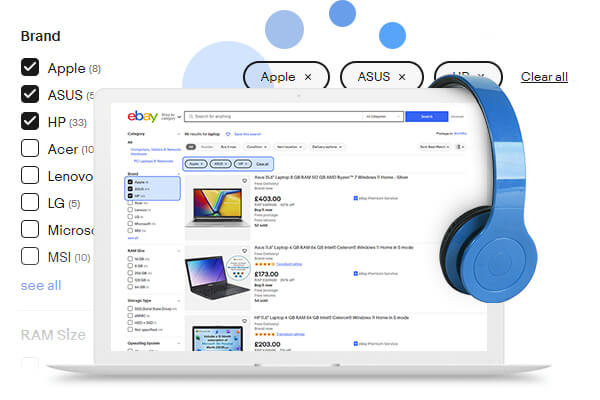
item specifics image
2. Poor Main Images
Your main image determines whether people click. A dark, blurry, or cluttered photo loses clicks to competitors with cleaner images — even if your product is identical.
eBay recommends 1600px on the longest side. White backgrounds work best for most products. Make sure the product fills at least 80% of the frame.
See our eBay product image background removal tool.
See video: https://www.youtube.com/watch?v=hs5qbq-fcjw
3. Weak Mobile Experience
Most eBay traffic is mobile. On the app, buyers see the first 200-250 characters of your description before tapping ‘read more’.
If those characters don’t answer key questions (what is it, what’s included, why buy from you), buyers bounce. Put your most important information first.
See eBay Mobile Design.
4. No Trust Signals
For anything over $50, buyers look for reassurance. They check:
- Return policy — is it clear and fair?
- Seller feedback — recent and positive?
- Listing quality — does this look like a professional seller?
A listing that looks thrown together creates hesitation. Professional presentation removes friction.
See eBay custom template options.
How to Audit Your Own Listings
Here’s a simple framework to identify conversion problems:
Step 1: Find Your Worst Performers
In Seller Hub, sort by conversion rate. Look for listings with decent traffic (50+ views) but conversion under 1%. These are your ‘leaky buckets’ — you’re paying for attention that doesn’t convert.
Step 2: Check Technical Issues
For each underperforming listing, check:
- Are all required Item Specifics filled?
- Is the main image high-quality and well-lit?
- Does the title include the terms buyers search for?
- Are there at least 5-6 images showing different angles?
Step 3: Review Mobile Preview
Use eBay’s mobile preview to see what buyers actually see on their phones. Is your key information visible without scrolling?
Step 4: Compare to Competitors
Search for your product as a buyer would. Look at the top-selling competitors:
- What do their main images look like?
- What’s in their titles that isn’t in yours?
- What shipping options do they offer?
Step 5: Monitor for 30 Days
After making changes, track conversion for a month. If you don’t see improvement, there may be deeper issues (pricing, competition, product-market fit).
Conversion Factors You Can Control
Shipping and Returns
Free shipping converts better than calculated shipping — buyers prefer knowing the total upfront. If you can’t offer free shipping, at least be fast. Same-day or 1-day handling improves both conversion and search visibility.
Clear return policies reduce purchase anxiety. ’30-day returns’ converts better than ’14-day returns’ or unclear policies.
Listing Design
Consistent, professional templates do two things:
- Build trust — buyers recognise you as a serious business
- Present information clearly — reducing questions and hesitation
If your listing looks like a wall of text, buyers won’t read it. Structure matters.
Pricing Strategy
You don’t have to be cheapest to convert well. Many buyers will pay slightly more for:
- Better photos that show exactly what they’re getting
- Clearer descriptions that answer their questions
- Faster shipping
- A seller with strong feedback
Competing on price alone is a race to zero margins. Compete on presentation and trust instead.
Getting Help
If you want a professional assessment of your eBay store’s conversion potential, we offer free listing audits. We’ll identify specific issues and give you a prioritised fix list.
For sellers who want hands-off improvement, our eBay SEO and design services handle the technical work while you focus on sourcing and fulfillment.
Related Links:
Share This Blog Post
Related Posts
Thanks! We'll be in touch within one business day.