Share This Blog Post
Most eBay sellers focus on getting more traffic. But if you’re already getting decent views, there’s a faster way to grow revenue: getting each customer to spend more.
That’s what Average Order Value (AOV) measures — the average amount spent per transaction. Improve it, and you make more money without needing more customers.
This guide covers the specific eBay tools that drive larger orders, from Volume Pricing to Order Discounts, plus the listing design factors that make buyers confident enough to add more to their basket.
What is Average Order Value and Why Does It Matter?
Average Order Value = Total Revenue ÷ Number of Orders
If you made $12,500 from 250 orders last month, your AOV is $50. You can find this in the Performance tab of Seller Hub.
Why focus on AOV instead of just getting more sales?
- Shipping efficiency — three items in one box costs less than three separate shipments
- No extra marketing spend — you’re making more from traffic you already have
- Better margins — fixed costs get spread across a larger order value
eBay’s search algorithm also factors in revenue per transaction. Sellers who generate higher cart values tend to get better visibility.
Frooition’s eBay Dynamic Cross Promotion Helps increase eBay Average Order Values
eBay Promotions Manager: Your Main Tool
The Promotions Manager in Seller Hub is where you set up most AOV-boosting offers. Here are the three most effective:
1. Volume Pricing
This offers a discount when buyers purchase multiple quantities of the same item. It’s ideal for consumables, accessories, and anything people might want more than one of.
Example tiers:
- Buy 2, get 5% off
- Buy 3, get 10% off
- Buy 5, get 15% off
The discount appears as a badge in search results, which can improve click-through rates as well as conversion.
Best for: Consumables, craft supplies, phone accessories, car parts, anything bought in multiples.
2. Order Discounts (Spend & Save)
This sets a spending threshold for a discount. ‘Spend $50, save $5’ creates a psychological target that encourages buyers to add items to reach it.
Tips for setting thresholds:
- Check your current AOV — set the threshold 20-30% above it
- Make the discount meaningful enough to change behaviour (10%+ of threshold)
- Promote across your whole store or specific categories
Best for: Stores with related products where adding one more item makes sense.
3. Coded Coupons
Single-use codes for specific customers or marketing campaigns. Useful for:
- Rewarding repeat customers
- Email marketing campaigns
- Recovering abandoned carts via ‘Offers to Buyers’
Cross-Selling in Your Listings
eBay’s algorithm does some cross-promotion automatically, but you can control it better with your listing design.
‘Related Items’ Sections
Add a visual section in your listing template that shows complementary products. If someone’s buying a camera, show them your lenses, bags, and memory cards.
This works because:
- Buyers see relevant products without leaving your listing
- You control what’s shown (not eBay’s algorithm)
- It keeps them shopping in your store instead of going back to search
One click to add in the Frooition Cross Selling Widgets to your eBay listings.
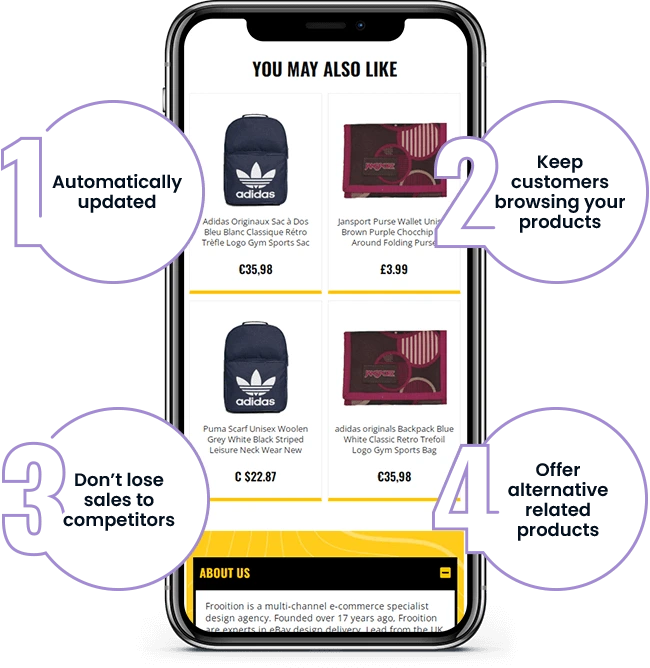
cross selling mobile
Bundle Listings
Create dedicated listings that combine commonly-purchased items at a small discount. A ‘3-piece starter kit’ often outsells individual items because it removes decision fatigue.
Use the ‘Bundle Listing’ attribute in item specifics so eBay categorises it correctly.
Store Design and Buyer Confidence
Buyers spend more when they trust the seller. If your store looks like a temporary operation, they’ll hesitate before placing a large order.
What Builds Confidence
- Consistent branding across all listings — same colours, layout, logo
- Clear policies visible in listings — returns, shipping, warranties
- Professional product photography — multiple angles, clear images
- Mobile-friendly descriptions — over half of eBay traffic is mobile
The Mobile Factor
Your first 250 characters matter most on mobile — that’s what buyers see before tapping ‘read more’. Use this space to highlight why they should buy from you, not just describe the product.
Did you know: Frooition’s ebay templates have meta data to control the mobile description preview text on the eBay app.
Action Plan: Increase Your AOV This Week
Here’s a practical starting point:
Step 1: Calculate Your Current AOV
Check Seller Hub → Performance. Note your current number as a baseline.
Step 2: Identify Cross-Sell Opportunities
Look at your top 20 listings by traffic. What complementary products could you promote alongside them?
Step 3: Set Up a ‘Spend & Save’ Promotion
In Promotions Manager, create an Order Discount. Set the threshold 25% above your current AOV. Make the discount at least 10% of that threshold value.
Step 4: Add Volume Pricing to High-Volume Items
If you have items that sell 50+ units per month, add Volume Pricing tiers to encourage bulk purchases.
Step 5: Review After 2 Weeks
Check the ‘Sales by Promotion’ report to see what’s working. Double down on effective promotions, adjust or drop the ones that aren’t converting.
Getting Help With Your eBay Store
If you want to implement cross-selling sections, consistent branding, or mobile-optimised templates but don’t have time to do it yourself, that’s what we do.
You can start with a free listing audit to see where your current setup might be losing sales, or talk to us about professional eBay store design.
Share This Blog Post
Related Posts

Thanks! We'll be in touch within one business day.