Share This Blog Post
Why Finding and Selecting the Correct eBay Category Matters (And How the Frooition eBay Category Finder Tool Solves It)
eBay Category Finder – When selling on eBay, every detail matters — but one of the most overlooked yet critical elements of a successful listing is choosing the correct category. It sounds simple, but the category you select influences everything from search visibility and buyer trust to how your listing shows item specifics and how well it performs in eBay’s Best Match algorithm.
Here’s why category accuracy is a game-changer — and why the Frooition eBay Category Finder Tool is the best solution for sellers serious about optimization, visibility, and sales.
1. The Role of Categories in eBay Search and Visibility
eBay’s Search Isn’t Just Keyword Matching
Unlike generic search engines, eBay’s search engine (Best Match) weighs structured data heavily — and category is a core part of that structure. Correct categories:
- Help eBay understand what you’re selling
- Increase relevance for buyer searches
- Improve visibility in filtered search results
Wrong categories can bury listings — meaning fewer views, fewer bids, and lower sales.
2. Boosting Performance With Correct Item Specifics
eBay item specifics are often tied to category selection. Here’s how they work:
Item Specifics = Better Filtering + Higher Relevancy
When buyers refine search results (e.g., by size, color, material), eBay relies on item specifics to filter accurately. But:
Without the correct category, eBay often hides required item specifics
This leads to missing data, which means lost visibility in filtered search results
Example:
If you list a jacket in a “Clothing” category that doesn’t display the proper specifics, buyers filtering by “Men’s Size L” may never see your item.
Result: Fewer views, fewer sales.
3. eBay Optimization Is Powered by Data — and Data Starts with Accuracy
Listing success depends on a combination of:
- Accurate titles
- Strong imagery
- Correct item specifics
- Optimised categories
The category you choose impacts all of the above:
Search relevance
Where your item appears in site navigation
Which filters your listing qualifies for
Whether eBay promotes your listing in recommendations
In short:
Incorrect categories = missed opportunities.
Start a free trial of our eBay Optimization tools via: https://www.frooition.com/ebay-seo/
4. Why Most Sellers Struggle With eBay Categories
eBay categories can be:
✔ Deeply nested
✔ Non-intuitive
✔ Slightly different depending on item specifics
✔ Time-consuming to locate manually
Many sellers:
❌ Guess categories
❌ Select popular but irrelevant ones
❌ Miss out on hidden subcategories
❌ Lose visibility to competitors
Which leads us to the real solution…
Introducing: The Frooition eBay Category Finder Tool
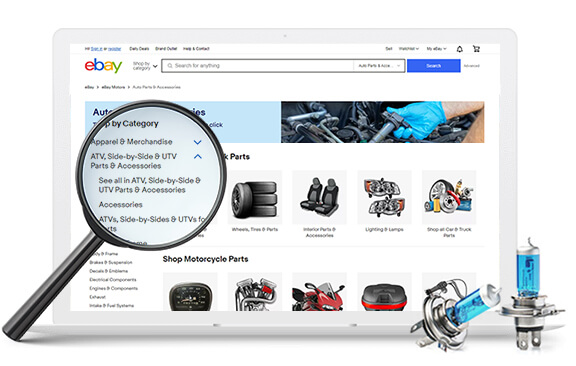
If correct categories and data accuracy are the foundation of optimized eBay listings, then the Frooition Category Finder Tool is your blueprint.
Try the Category Finder Tool here:
https://www.frooition.com/ebay-category-feature-finder-tool/
What It Does
The Frooition Category Finder Tool helps you:
✅ Find the most precise eBay category for your item
✅ See recommended item specifics based on category
✅ Understand how eBay treats categories for filtering
✅ Save time and reduce human error
No more guesswork. No more blind listing. Just data-driven accuracy.
The Practical Benefits of Using the eBay Category Finder Tool
1️ – Increased Search Visibility
By selecting the correct category, your listings appear higher and more relevant in search results.
2️ – Better Filtering Matches
Buyers using filters actually see your products — leading to higher engagement and conversion.
3️ – Time Saved on Manual Research
No need to navigate eBay category hierarchies manually — intelligent suggestions speed up listing.
4️ – Higher Conversion and Sales
More exposure + better data = more views + more sales.
Put It All Together: Category + Item Specifics = Sales
A well-optimized eBay listing isn’t just about keywords or images. It’s about structured, accurate data.
Choosing the wrong category is like building a house without a foundation — everything else collapses.
But when you:
Select the right category
Add the right item specifics
Use data-driven tools to assist…
…you’re setting up your listing to perform as well as possible.
Conclusion on eBay Category Finder
Correct categories aren’t optional — they are essential.
They impact:
Search ranking
Buyer filtering
Listing optimization
Conversion and sales
And the Frooition eBay Category Finder Tool is the easiest, most reliable way to get them right.
Discover the right category every time:
https://www.frooition.com/ebay-category-feature-finder-tool/
Ready to Optimize All Your Listings?
If you want better performance, better data, and better results on eBay — start with category accuracy. The Frooition tool removes guesswork and equips you with the structured data you need to thrive in eBay search and sales.
Share This Blog Post
Related Posts


Thanks! We'll be in touch within one business day.