Share This Blog Post
How to Install a Free eBay Listing Template: A Step-by-Step Guide
If you have been searching for a straightforward way to make your eBay listings look more professional, you are in the right place. This guide walks you through exactly how to install a free eBay listing template using Frooition — from creating your account to applying a fully branded design across every one of your live listings. The whole process takes around ten minutes and costs nothing.
Frooition’s eBay listing templates are used by more than 5,000 sellers worldwide. As a Certified Gold eBay Partner, Frooition builds every template to comply with eBay’s active content policy and to work seamlessly on mobile devices, tablets, and the eBay app — so you do not need to worry about compliance or formatting once it is applied.

Custom eBay Template Packages
Want Listings That Truly Reflect Your Brand?
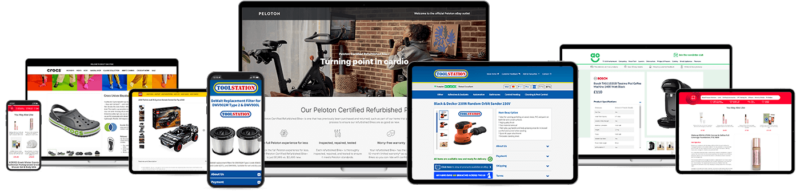
Our free templates are a great starting point — but if you want listings designed exclusively around your business, products, and customers, Frooition’s custom eBay template packages deliver a unique professional presence that sets you apart from the competition.
What You Will Need Before You Start
Before you begin, make sure you have the following to hand:
- An active eBay seller account
- Your brand logo file (PNG or JPG works fine)
- A few minutes of your time
That is it. No coding knowledge is required, and no credit card is needed for the free plan.
Step 1 — Create a Free Frooition Account
Go to secure.frooition.com/signup and complete the quick sign-up form. Frooition’s free plan gives you access to 600+ pre-designed listing templates, as well as the tools needed to apply them to your listings in bulk. There is no trial period to worry about — the free templates are available from the moment your account is active.
Step 2 — Connect Your eBay Token
Once you are logged into your Frooition dashboard, the next step is to authorise your eBay account by connecting your eBay token. This is a standard eBay authentication step that gives Frooition permission to apply your chosen design to your live listings.
If you are not sure how to do this, Frooition has a dedicated guide at frooition.com/how-to/renew-my-ebay-token/. The process takes around two minutes and only needs to be completed once (tokens do occasionally expire and need renewing, but you will be prompted when that happens).
Step 3 — Browse and Choose a Template
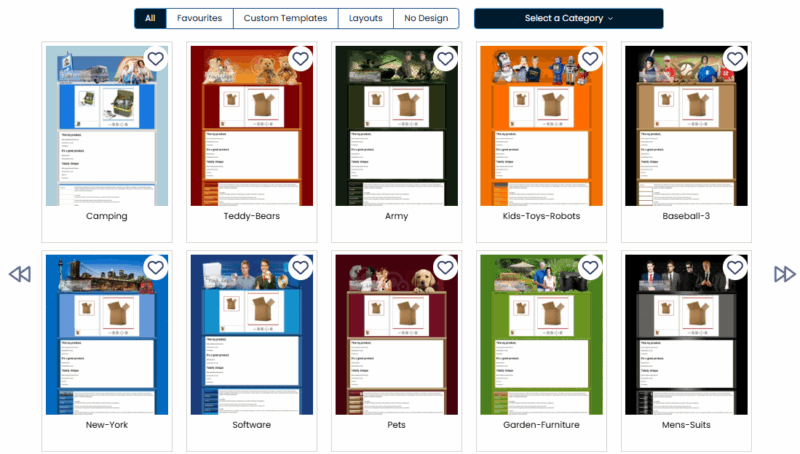
With your eBay token connected, head to your Frooition dashboard and click Design in the left-hand navigation menu, then select Listing Template Designs.
You will be presented with a library of over 600 pre-designed free eBay templates spanning a wide range of styles — from clean and minimal to bold and category-specific. Browse the designs, find one that fits your brand, and click Next to proceed.
A few things to consider when choosing:
- Category fit — some templates are designed with specific product categories in mind (e.g. automotive, fashion, electronics). Picking one that aligns with your inventory reinforces professionalism.
- Colour palette — choose something that complements your existing branding or logo colours.
- Mobile layout — all Frooition templates are mobile-responsive by default, but previewing the mobile view before committing is always a good idea.
Step 4 — Add Your Logo
On the next screen, you will be prompted to upload your brand logo. This is embedded into the template header, giving your listings a consistent, branded look that helps build buyer trust. Supported formats are PNG and JPG. Once your logo is uploaded, click Next.
If you do not have a logo yet, you can skip this step and add one later — the template will still apply cleanly without it.
Step 5 — One-Click Apply to All Your Live Listings
This is the step that makes Frooition’s approach particularly useful for sellers with large inventories. Rather than editing listings one by one, Frooition’s Auto Apply tool pushes your chosen template across every one of your live eBay listings simultaneously with a single click.
Once applied, your listings will immediately display the new design — complete with your logo, the template layout, and a dynamic cross-promotion section that surfaces related products from your store to keep buyers browsing.
What Changes After You Install the Template
Once your template is live, buyers visiting your listings will see a noticeably more professional presentation. Here is what the template adds:
Consistent branding. Your logo and brand colours appear uniformly across all listings, helping you stand out from sellers using plain eBay defaults.
Dynamic cross-promotion. A section at the bottom of each listing automatically pulls through related products from your store. This keeps buyers within your inventory rather than navigating away.
Mobile-optimised layout. Every Frooition template is built to render correctly on mobile devices, which matters because a significant proportion of eBay purchases are now made via smartphone or app.
eBay-compliant code. As a Certified Gold eBay Partner, Frooition ensures all templates meet eBay’s current policies — including the active content policy that has caused issues for sellers using older third-party templates.
SEO-friendly structure. Templates are built with eBay’s Cassini search engine in mind, using structured headings and fast-loading design elements that can improve how your listings rank in eBay search results.
How Free eBay Templates Affect Sales
Frooition reports that sellers typically see a 30% increase in sales after switching to a professionally designed template. While individual results vary depending on product category and pricing, the underlying reasons are straightforward: a polished listing creates more buyer confidence, cross-promotion increases average basket value, and better mobile rendering reduces drop-off on smaller screens.
The improvement is particularly noticeable when compared to the plain-text listing format that many eBay sellers still use. Buyers make quick judgements about seller credibility, and a consistent, well-designed listing communicates professionalism in a way that plain descriptions cannot.
What Comes Next: Features Available in Paid Plans
The free template gives you everything needed to get started. Sellers who want to go further can explore Frooition’s paid plans, which include:
- Multiple templates — apply different designs for different product categories or seasonal promotions
- eBay Bulk Revision — update item specifics, descriptions, and other listing fields across thousands of listings at once
- eBay Item Specifics tool — automatically fill in missing category-level item specifics, which eBay increasingly uses as a ranking signal
- eBay Video — embed product video directly into your listings
- Advanced SEO optimisation — title, description, and item-specific improvements informed by Cassini ranking data
Frooition’s eBay Top Seller Package is the most popular paid tier for high-volume sellers and includes a fully custom-designed template built around your specific brand.
Frequently Asked Questions
Is the free template really free? Yes. Frooition’s free plan includes access to 600+ templates and the one-click apply tool at no cost. There is no credit card required to sign up.
Will installing a template affect my existing listings? The template adds a design layer around your existing listing content — titles, descriptions, images, and item specifics are unchanged. If you decide to remove the template later, your underlying listing data is unaffected.
Does the template work on mobile? Yes. All Frooition templates are built to be fully responsive and have been tested across mobile browsers and the eBay app.
How long does it take to apply the template to all my listings? The Auto Apply process runs in the background and usually completes within a few minutes, even for sellers with thousands of active listings.
What happens if my eBay token expires? Frooition will notify you when your eBay token needs renewing. You can follow the renewal steps at frooition.com/how-to/renew-my-ebay-token/ — it is a quick process and your template remains live on your listings throughout.
Ready to Install Your Template?
The quickest way to get started is to create your free Frooition account at secure.frooition.com/signup. From there, the full installation process described above takes around ten minutes, and your listings will immediately look more professional.
If you have questions about which template to choose, or want to discuss a custom design for your store, contact the Frooition team for a free consultation.