Share This Blog Post
The eBay Seller Hub is no longer just a place to print labels; it is a sophisticated ERP (Enterprise Resource Planning) tool. In 2026, the Hub integrates Magical AI and advanced predictive analytics to help you stay ahead of global competition. This eBay Seller Hub Guide will help explain how to get started.
1. How to Access the eBay Seller Hub
If you are still seeing the classic “My eBay” view, you are missing out on vital data.
- Direct Link: Go to ebay.co.uk/sel/hub (UK) or ebay.com/sh/ovw (US).
- Opt-in: If you haven’t transitioned, click “Start Using Seller Hub” on the landing page. It is free for all business sellers.
2. Navigating the eBay Seller Hub: Tab-by-Tab Breakdown
Overview: Your Command Center
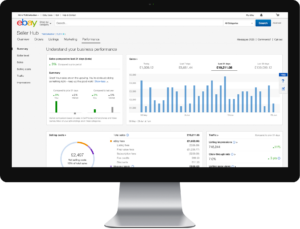
The Overview tab in the eBay Seller Hub is fully customizable. In 2026, the “Action Items” widget is your most important tool, highlighting overdue shipments, cases pending your input, and “Underperforming Listings” that need an AI title refresh.
eBay Orders: Fulfillment & Customer Service
This is where you manage the post-sale lifecycle.
- Awaiting Postage: Bulk-print labels and manifest forms.
- Returns & Cancellations: Handle disputes directly. In 2026, eBay’s AI Dispute Assistant can suggest resolutions based on your historical data.
eBay Listings: The Engine Room
This tab allows you to manage active, scheduled, and ended listings.
- How to Create a New Listing: 1. Click “Create Listing” > “Single Listing” or “Bulk via AI.”
- The “Magical” Feature: Upload 5+ photos. eBay’s AI will now auto-fill 90% of your Item Specifics.
- Category Selection: (See Section 3 for more on this).
- Frooition Integration: Ensure your description uses a Frooition Dynamic Template to ensure mobile compliance and brand consistency.
Marketing: Growth & eBay Advertising
The 2026 Marketing tab is built around the “Any-Click” Attribution Model.
- Promoted Listings: Manage “Standard” (pay-per-sale) and “Advanced” (CPC) campaigns.
- Promotions Manager: Set up Multi-buy discounts to increase your Average Order Value (AOV).
- Social Sharing: Link your Instagram and TikTok directly to track off-eBay traffic conversions.
eBay Store: Branding & Identity
This is where you manage your digital storefront.
- Store Categories: Create custom categories (e.g., “Winter Collection 2026”) to help buyers browse.
- Billboard & Logo: First impressions matter. A generic billboard drives buyers away; a Frooition-designed storefront keeps them browsing.
Performance: The Data Lab
- eBay Traffic Report: Tracks Impressions, Click-Through Rate (CTR), and Sales Conversion Rate (SCR).
- Service Metrics: Compare your “Item Not as Described” rate against peers to avoid “Very High” penalty fees.
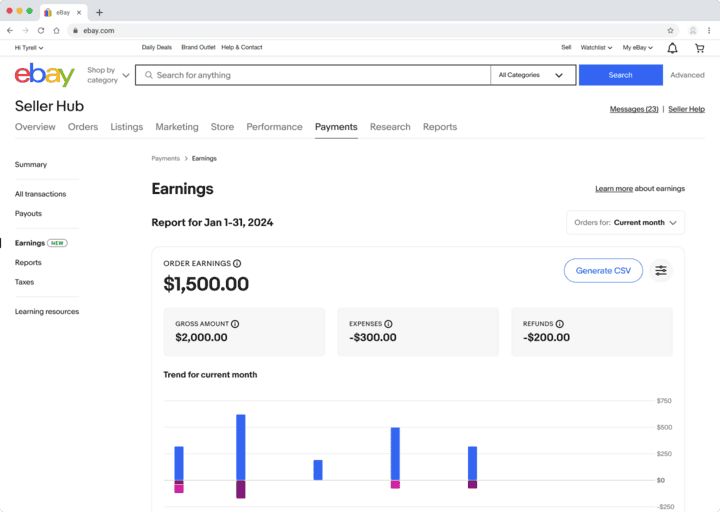
eBay Payments: Your Treasury
With the 2026 fee restructuring, tracking your net take-home is vital.
- Payouts: View scheduled transfers to your bank.
- Tax Invoices: Download monthly summaries for accounting.
eBay Research: Terapeak Intelligence
Terapeak Product Research is the “cheat code” of eBay.
- Enter a keyword to see Sell-through rates, Average Sold Price, and Top Performing Competitors.
- Sourcing Insights: Use this to see which categories are trending before you buy stock.
Reports: Professional Documentation
The Reports tab (formerly File Exchange) is for power users.
- Upload/Download: Manage thousands of listings via CSV/Excel.
- Performance Reports: Export raw data to see exactly which “Item Specifics” are driving your sales.
3. Understanding eBay Categories & Search
Categories are the DNA of the eBay search engine (Cassini).
- Primary Category: Where your item lives. Choosing “Home & Garden” vs. “Antiques” can drastically change your visibility and Final Value Fees.
- Suggested Categories: eBay’s AI will suggest these, but always double-check. In 2026, placing an item in a “Niche Category” can often lead to higher conversion than a “Broad Category” due to less competition.
- Try using Frooition’s eBay category finder tool for your inventory.
4. How to Set Up an eBay Store (Step-by-Step)
A Store subscription is essential for any serious business.
- Choose a Subscription: (Starter, Basic, Featured, Anchor, or Enterprise).
- Name Your Store: Keep it professional and SEO-friendly.
- Design Your Store: Go to Store > Edit Store.
- Warning: The default eBay “Storefront” is very basic. Most professional sellers use Frooition to build a custom, high-converting “Brand Home” that mirrors their own website.
- Set Up Newsletters: Use the “Store Newsletter” feature to email previous buyers about new arrivals.
5. Managing Your Store with the eBay Seller Hub: Daily Routine
- 09:00: Check Orders > Awaiting Postage. Ship items to maintain “Top Rated Seller” status.
- 10:00: Review Performance > Traffic. If a listing has high impressions but 0 sales, update the price or the Frooition template design.
- 11:00: Use Terapeak to research the next month’s inventory.
- 14:00: Run a Marketing Report to see if your “Any-Click” ad spend is profitable.
Why High-Performance Sellers Choose Frooition
The eBay Seller Hub gives you the data, but Frooition gives you the results.
- Bypass the “Generic” Look: In 2026, AI-generated listings all look the same. A custom Frooition design makes you look like a trusted brand.
- Increase Organic Rank: Our eBay Optimization Managed Service for eBay listings help optimize listings for eBay’s 2026 SEO algorithms, helping you rank higher without paying for Promoted Listings.
- Cross-Selling: Our “Smart” modules automatically show your other Hub listings to buyers, increasing your sales by up to 30%.
Ready to dominate eBay in 2026?
Request a Free Frooition Demo and see how we turn your Seller Hub data into a world-class eBay brand.